Managing System Software
Warning
Updates are only available for licensed Policy Servers with an active Maintenance subscription.
Checking System Software Versions
Software packages are identified by four parts. Name, Revision Number, Version Number, and Revision Date.
- NAC-CT - Policy Server Software
- NAC-SS - Sensor Software
- NAC-AGENT - Agent Software
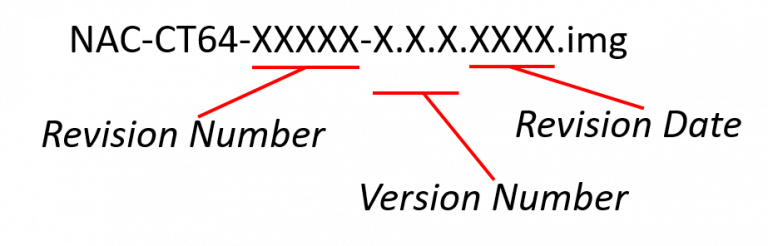
In addition to the software installed on the Policy Server or the Network Sensor, the Policy Server may also store a software image to be used for updating at a later time. For example, a Policy Server with version 5.0.19 installed may have a copy of Version 5.0.20 that can be used for updating the Policy Server, Network Sensors, or Agents at a later time.
System > Update > Genian Software will display the newest version of software stored on your Policy Server, even if it is not installed.
You can see the software version installed on individual Policy Servers and Sensors by navigating to System in the top panel. All appliances will be shown in the view pane along with the installed software.
NAC Operational Data Management
Download the latest data from the Genian Cloud Server.
- CVE Update information, Information about vulnerabilities in platforms.
- Node information, Data for gathering platform information
- OS Update Information, Information about updating your device operating system
- PI Update Information, Data for classifying platform information
- Platform Information, Data for detecting operating systems
Setting up automatic update of Genian data
automatically update the latest data with the Genian Cloud Server and periodic version checks.
- Go to Preferences in the top panel.
- Select General > Miscellaneous item on the left
- Set the time and action in the Genian Data Settings topic
(Genian Data updates are set to work by default.) (To update Genian data, the 'Internet Access' option must be enabled in Miscellaneous settings.)
Manually update Genian data
- Go to System > Update > Genian Data in the top panel.
- Click the
Update`button at the top left. - If there is a new version, the update will be done automatically.